
Often you have a list of values that you need to put into a query, but you only need certain columns of the data. I used to have to edit the data to get it in the format I needed, but now I can easily copy out the values I need using a single ALT key.
Below is a query I need to run. Unfortunately I only need the last 4 digits of the number, so I do not need all of the leading zero’s.

Using the ALT key, you can select fixed blocks (rather than the entire line) of code. By holding down the Alt key during text selection, you can limit the selection to only the region you specify rather than grabbing all of the text on every line. See how only the last 4 digits are highlighted?

Now we can copy and pasted the values in the query!

I also need to put comma’s and single quotes around each row. I can also use the same ALT-click trick to do this. I put my cursor after the last value on line 3, then I click Alt and left click and drag it down to the bottom of the list. You can see the faint blue line (highlighted in yellow).

Now I put in a single quote and a comma and press enter and it fills in each row.
Just remember when you copy and paste like this, you have to vertically select the paste region just like you did with the copy.
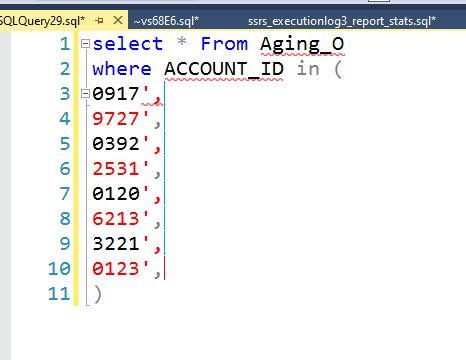
Now I do the same thing on the left side. Hold the ALT key and left click and drag down.

Now I put in a another single quote and press enter. Now we have a correctly formed query.
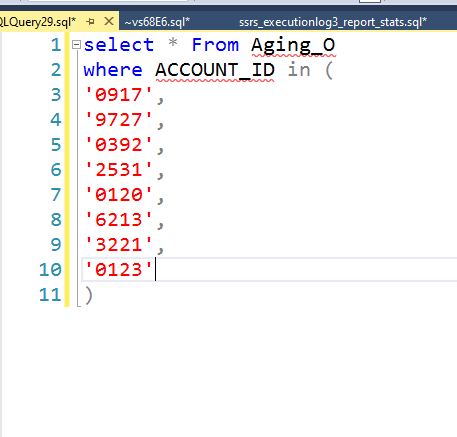
This trick also works in other applications. I often use it in Notepad++, see below.

 Jim Salasek's SQL Server Blog