
Find SQL Server Tables with Identity Columns Easily

How would you find all the tables in a SQL Server Database that have identity columns? Read on to find an easy query to identify them (see what I did there 🙂 )

Read more: Find SQL Server Tables with Identity Columns Easily

Here is a listing of some tables in my database. I need to find all of the tables that have an identity column set up.

The slow way is to open up each table in design view and look at each column.

After opening up the table you would then need to check each field to see if identify specification is set to YES.
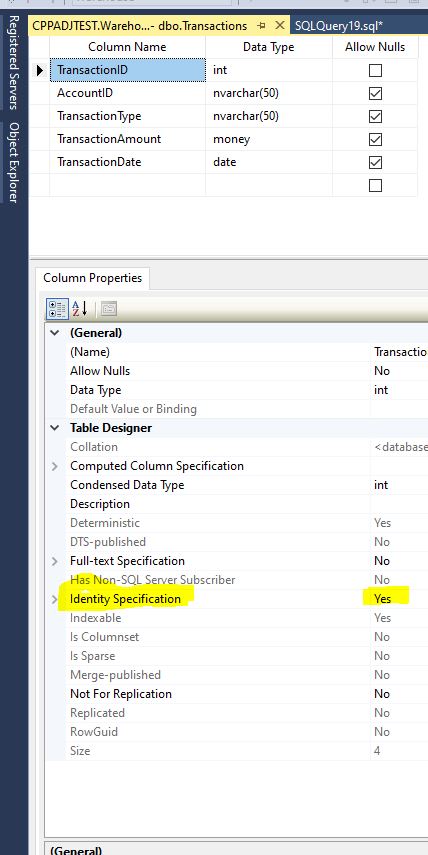
This way is slow.

The easiest way to check your database is to run the query below. This will show every table and the column name that is set to Yes.

SELECT DB_Name() AS DatabaseName
,OBJECT_NAME(c.OBJECT_ID) AS TableName
,c.NAME AS ColumnName
FROM sys.columns c
INNER JOIN sys.tables t ON c.object_id = t.object_id
WHERE is_identity = 1

Let us look at the Dim_City table in design view. After opening it up, we can see that CityId has Identity Specification set to Yes. This matches what the query turned up.

Do not be afraid of the database system views. They can be very helpful in documenting your database and are much quicker than clicking around in the GUI.

Find Columns In Your Database

There are many reasons why you would want to find a specific column or data type in your database. Read on to find some ways to accomplish this.

Read more: Find Columns In Your Database

Here is one way. It is slow and involves opening every table in SSMS.

Then you need to expand the table and then the columns to display each field.

One quick way is to use the SP_COLUMNS procedure. The easiest way to run it is to provide the table name that you wish to look for.

EXEC sp_columns @table_name = 'tbl_products'

The quickest way in my opinion is to use the INFORMATION_SCHEMA.COLUMNS view. In the query below, I am searching for the table name: tbl_products. This lists all of the columns and their data type.

SELECT * FROM INFORMATION_SCHEMA.COLUMNS WHERE TABLE_NAME = N'tbl_products'

Also with this view, you can search for only columns of a certain data type. In the example below, I want to see every table and column that has a data type of TEXT. With this query it is very simple.

SELECT * FROM INFORMATION_SCHEMA.COLUMNS WHERE DATA_TYPE='text'

To read more about these Microsoft provided views/stored procedures, please follow the links below.

https://learn.microsoft.com/en-us/sql/relational-databases/system-stored-procedures/sp-columns-transact-sql?view=sql-server-ver16

https://learn.microsoft.com/en-us/sql/relational-databases/system-information-schema-views/system-information-schema-views-transact-sql?view=sql-server-ver16

https://learn.microsoft.com/en-us/sql/relational-databases/system-information-schema-views/columns-transact-sql?view=sql-server-ver16

SQL Server Agent: WARNING: The following job steps cannot be reached with the current job step flow logic:

I recently got this error when trying to add a step in an agent job. What caused it and how did I fix it?

Continue reading SQL Server Agent: WARNING: The following job steps cannot be reached with the current job step flow logic:

Powershell: ReportingServicesTools. Download ALL RDL files from a SSRS server.

Can you download all of the RDL files from a SSRS server? You sure can, and it is easy using PowerShell and the ReportingServicesTools module.

Continue reading Powershell: ReportingServicesTools. Download ALL RDL files from a SSRS server.

SSIS ORA-00900: invalid SQL statement calling Oracle Procedure

Calling an Oracle stored procedure in SSIS is a little different than calling a SQL Server version.  Today I will show you the error you get if trying the SQL Server syntax and how to fix it.

Continue reading SSIS ORA-00900: invalid SQL statement calling Oracle Procedure